Design - Favorites
June 16, 2026
Last updated on June 29, 2026
OneNote favorites are just like favorites in your Web browser: you save a page as a favorite, and then get to navigate back to that page at a later time by clicking that favorite.
Along the way, users have requested new features, including:
- Can be organized in folders
- Can be given a friendly name (alias)
- Can be saved with a key sequence
- Can be managed from the Favorites dialog (add, delete, organize, validate)
- Can be exported/imported across machines
Why Move to a Database?
In the initial implementation it was designed to store each favorite as a bit of Ribbon XML - very convenient for programming, but ultimately fragile and limiting. There was always the lingering concern that the XML-based file was too tightly reliant on the OneNote ribbon schema, conflating data with metadata, muddying model-view-controller overlap, and could break with any new release of OneNote. So moving the data to a real storage model and abstracting the view-controller pieces was always a long-term goal.
The requirement to organize into folders became the real tipping point to move favorites into the OneMore.db database, expanding its responsibility along with hashtags and table variables.
To maintain simplicity in both design and use, folders are limited to root folders only. The Favorites ribbon drop-down menu can contain a list of favorites and a list of folders, and those folders can have only a list of favorites themselves. No folders of folders.
Friendly Names
OneNote does not prevent creating two pages with the same name in a single section. To avoid the confusion when saved as favorites, users are allowed to give friendly names to each favorite. The friendly name (alias) defaults to the actual page name until explicitly overridden.
Migration
If a Favorites.xml files exists, OneMore migrates this immediately upon the first use of Favorites. Uses include: expanding the Favorites drop-down menu, opening the Favorites dialog, opening the Settings/Favorites sheet, and of course, adding the current page to the Favorites list.
Once migrated, all subsequent uses will then only use the database.
Database Schema
These simple table definitions mirror the model classes in Commands\Favorites\Favorites.cs.
|
Favorites ER (Extract) |
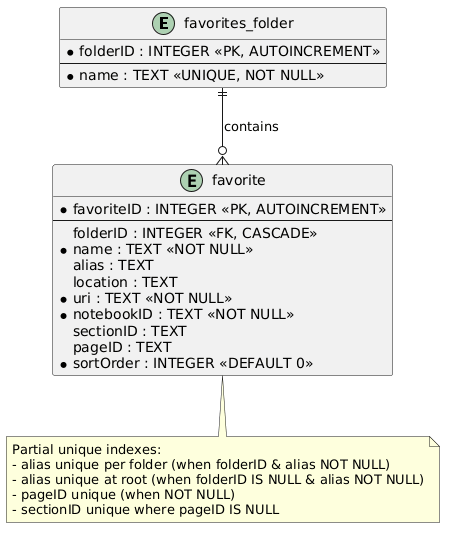
──────────────────────────────────────────────────────────────────────────────────────────────────
Favorites ER PlantUML (Refresh)
@startuml
entity "favorites_folder" {
* folderID : INTEGER <<PK, AUTOINCREMENT>>
--
* name : TEXT <<UNIQUE, NOT NULL>>
}
entity "favorite" {
* favoriteID : INTEGER <<PK, AUTOINCREMENT>>
--
folderID : INTEGER <<FK, CASCADE>>
* name : TEXT <<NOT NULL>>
alias : TEXT
location : TEXT
* uri : TEXT <<NOT NULL>>
* notebookID : TEXT <<NOT NULL>>
sectionID : TEXT
pageID : TEXT
* sortOrder : INTEGER <<DEFAULT 0>>
}
"favorites_folder" ||--o{ "favorite" : "contains"
note bottom of "favorite"
Partial unique indexes:
- alias unique per folder (when folderID & alias NOT NULL)
- alias unique at root (when folderID IS NULL & alias NOT NULL)
- pageID unique (when NOT NULL)
- sectionID unique where pageID IS NULL
end note
@enduml
#omwiki #omdeveloper #omtechnote
© 2020 Steven M Cohn. All rights reserved.
Please consider a sponsorship or one-time donation to support ongoing development
Created with OneNote.